
Krunker
 (1 votes, average: 5.00 out of 5)
 Loading...









Play Krunker online for free and dive into nonstop action! This fast-paced, pixel-style FPS lets you battle players worldwide in exciting arenas.
Start instantly on Krunker.io, with no downloads or waiting. Whether you love quick challenges, mastering cool movement tricks, or exploring thousands of custom maps, it is fun, easy to play, and full of surprises.
Test your aim, show your skills, and enjoy endless battles anytime, anywhere!
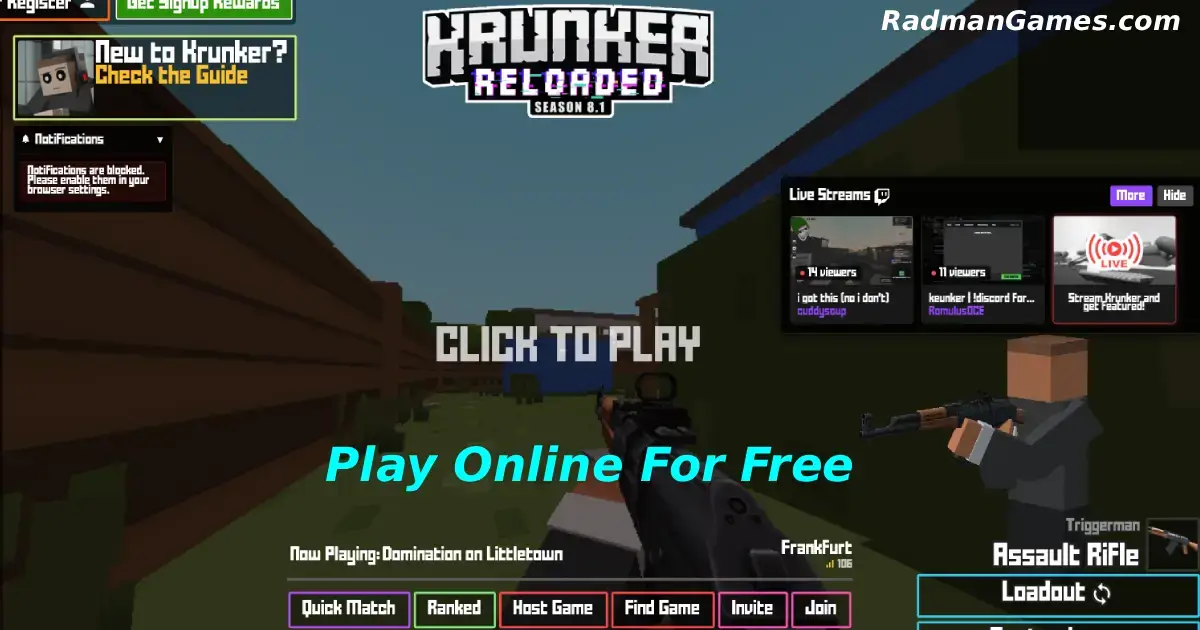
Krunker is a free, fast-paced pixel-style shooting game that you can play directly in your web browser with no downloads required.
The game was created in 2018 by Australian brothers Sidney and Vincent de Vries, who later founded Yendis Entertainment. It started as an open beta on May 20, 2018, and officially launched on January 29, 2019.
In 2022, FRVR Limited acquired Krunker and added new updates and features. Today, millions of players worldwide enjoy it for its quick action, creative maps, and fun community. Many fans also search for KEYBI KRUNKER or Krunknuss, showing how popular the game is across the internet.
this free online game is a fast-paced first-person shooter where players enter pixel-style arenas and battle in real-time. The gameplay is easy to learn but full of skill.
Players move with the keyboard, aim and shoot with the mouse, and can master advanced tricks like slide hopping to move faster.
The game includes different classes, each with special weapons such as rifles, snipers, or shotguns. Matches are quick and exciting, with modes like Free for All, Capture the Flag, and Infected. Players can also try thousands of custom maps and modes created by the community, which makes the gameplay fun and always fresh.
You can play Krunker right in your web browser on desktop, laptop, tablet, or mobile. The game works smoothly with no download required.
To play this game, your device should meet these minimum requirements:
It is a lightweight browser game that runs smoothly on most PCs, laptops, and even some tablets. Make sure your device meets these requirements to enjoy the best gaming experience.
this free game is a fast and exciting shooting game where you play against other players online. To win, you need to move around the map fast and aim carefully to hit your enemies.
The game is all about quick reactions and smart strategies to be better than others. Each match is short, so stay alert and try to collect weapons and power-ups while you play.
Your goal is to get more points by defeating enemies before they defeat you. You can join any game right away or pick different game modes to have more fun and challenges.
On a desktop or laptop, you can play using your mouse to aim and shoot. On mobile or tablet, you use friendly touchscreen buttons to move and attack just like a big kid!
This online game is a fast and exciting online shooter game with simple graphics that run well on most devices.
The game has many different classes, each with unique weapons and abilities. You can play different game modes like Free For All, Team Deathmatch, and Capture the Flag.
The maps are small, making the matches quick and fun. It has easy controls and lets you customize your character’s look.
You can play alone or with friends, which makes the game more enjoyable. Regular updates add new content to keep the game fresh and fun.
This version on our website lets you play straight in your browser with no download needed. It is a special edition of the famous Krunker game and works well on all major browsers, including Google Chrome, Mozilla Firefox, Microsoft Edge, Safari, and Opera. Just open the game and enjoy instant fun on your computer, tablet, or phone.
You can play the modified version for free. There are no costs, no hidden fees, and no extra purchases.
Everything in the game is open for fun. Even better, every game on our website is free to play, so you can enjoy nonstop action anytime.
Yes! You can play anytime on our website. Whether you are at school, at work, or on a short break, you can enjoy the game with no restrictions.
Many kids search for Krunker GitHub to bypass blocks that stop them from playing. But on our website, you don’t need to worry about that! The version of this game here works perfectly on all devices, so you can have fun playing anytime, whether you are at school, at work, or on a short break.
Many players love to download Krunker on their devices for a smoother and faster gaming experience compared to playing in the browser. Here’s how you can do it:
For Android users
Go to Google Play, tap Install. The game will download and be ready to play in seconds.
For iPhone and iPad users
Visit the App Store, tap Get to install the game instantly.
If your Android phone does not support Google Play, you can still download it with an APK file. Just search for “Krunker APK,” download the file from a trusted website, and install it directly, no Play Store needed.
You can also enjoy it on your computer for free. Play on a bigger screen using full controls by downloading it from the Steam Store.
It entered open beta on May 20, 2018, and was officially released on January 29, 2019.
No official age rating is listed, but the game’s pixel-style visuals and browser platform make it suitable for ages 6+.
It runs in your browser using HTML5 and WebGL.
If you’re a fan of Krunker, you’ll definitely enjoy these too:
This question isn’t related to this game. It’s about something else. Let’s focus on game questions to keep things clear and helpful!
You can earn badges by helping make maps, creating skins, or translating the game. Showing real effort gets you rewarded.
You can join ranked matches by clicking the “Ranked” tab in the main menu. Choose a match and queue up to compete.
Same as 2024. Just open the “Ranked” section and join a match. The gameplay works the same, so you’re ready to jump right in.
Click “Custom Game,” choose “Private,” set your game settings, and invite your friends with the private room code.
“krunk” is just a fun, made-up name. It doesn’t have a special meaning in the game.
Game access might be blocked if your school or work firewall stops it. Try using a different network or ask someone to help you join.
It is a fast-paced, pixel-style first-person shooter. In this exciting browser game, players enter a colorful pixel world and compete against others from all around the world.
Yes! You can play in full-screen by clicking the full-screen icon at the bottom right corner of the game screen. Playing in full screen gives you a bigger, more exciting view of the game, making it even more fun on your PC, tablet, or mobile device.
Krunker is a fast-paced, free browser shooting game where you can battle online, create custom maps, and join a global community.
With simple pixel graphics and smooth controls, you can start playing instantly on PC, tablet, or mobile. Constant updates, unique game modes, and community events keep every match exciting.